Make a Decision brief
One question, the options, and a recommendation resting on evidence Studio has checked, signed off by the people who decide.
A Decision brief is the page a forum decides from: one question, the options and their trade-offs, a recommendation, and the evidence behind it. The agent writes it from the analysis it just ran. It opens on the Stage, where you and your colleagues edit it together, and it records who signed what.
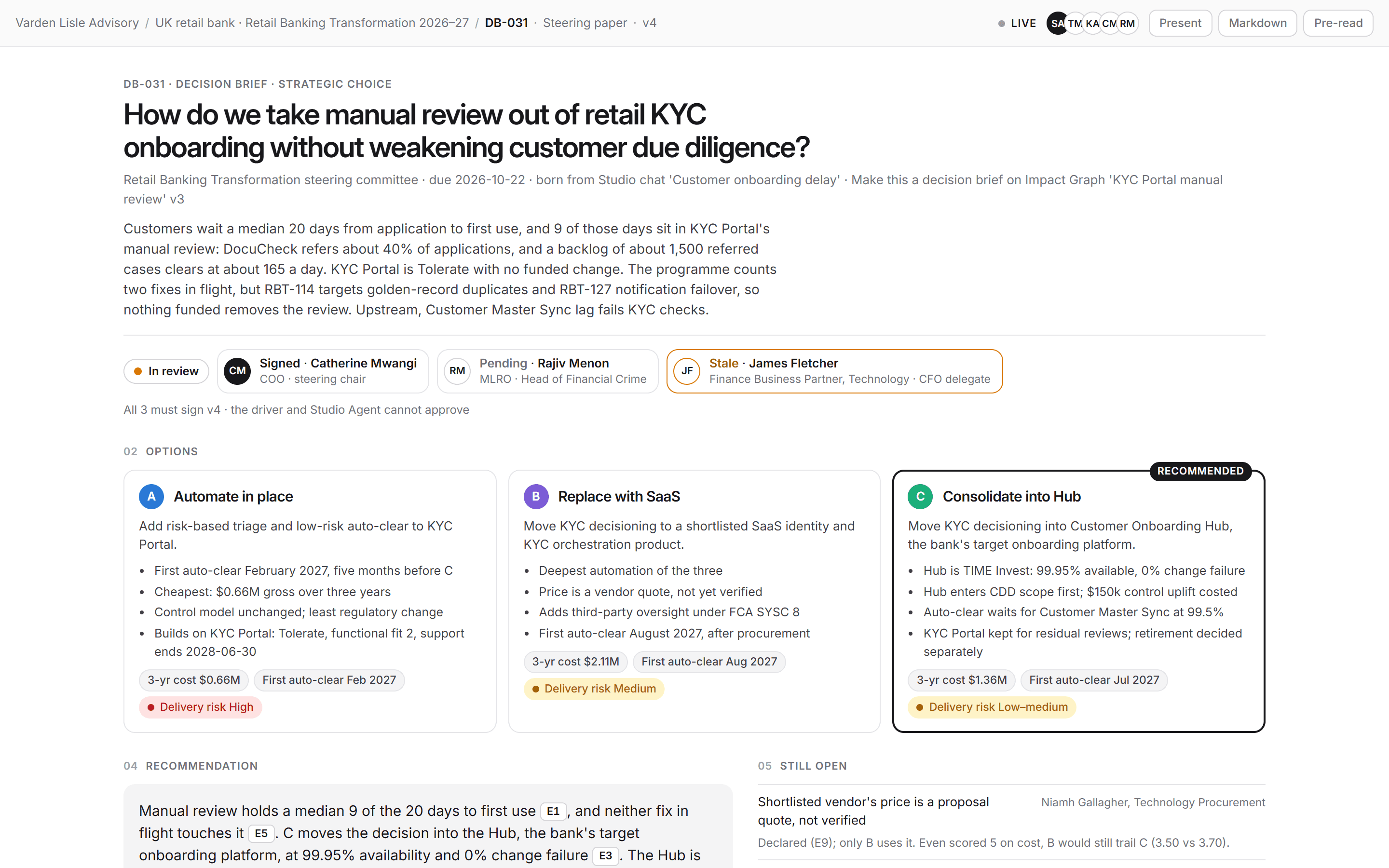
Make one
- Run the analysis in a chat with your sources connected: a board, a roadmap, a cascade, a chart, or an assessment.
- Choose Make this a decision brief on the artifact on the Stage, or on an assessment's results. You can also just ask the agent for one.
- Read it on the Stage, then steer: "Add a do-nothing option", "Tighten the recommendation", "Who owns each action?"
What's in a brief
- The question, the forum that decides it, and when.
- Options, usually two to five, each with its trade-offs, cost, timing, and delivery risk. One is marked Recommended.
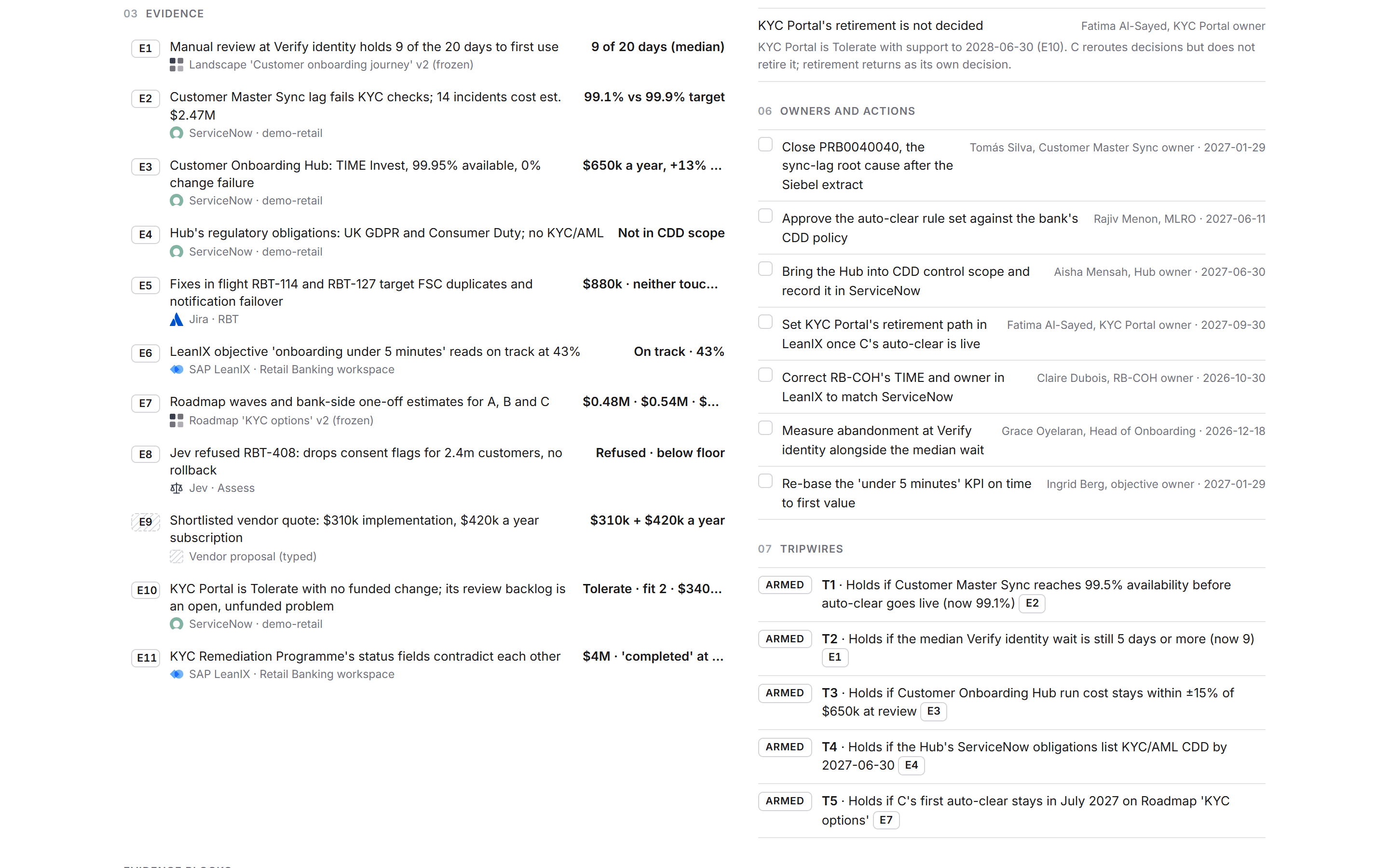
- Recommendation: the reasoning, with each claim citing its evidence (E1, E2, and so on).
- Still open: what is not yet known, and who owns it.
- Evidence: every fact the brief relies on, named after the system it came from.
- Owners and actions, with due dates.
- Tripwires: the conditions under which the decision should be revisited, such as "Holds if availability reaches 99.5% before go-live".
- Evidence blocks: the figures, charts, and tables that back the options, such as a weighted appraisal or a cost build-up.
- Event log: an append-only record of who drafted, changed, signed, or dissented, and when.
Evidence Studio checks
Studio, not the agent, checks the evidence. Every value the brief cites is matched against what your connected sources actually returned. Each piece of evidence is marked:
- Verified: the source returned that value.
- Mismatch: the source returned something else. Both values are kept, so you can switch to the source's value.
- Unverified: Studio couldn't find it in what the sources returned. Typed-in figures and values the agent worked out itself stay unverified.
The recommendation can rest only on verified evidence. A cited mismatch or unverified item blocks review until it is fixed.
Edit together
Several people can work on a brief at once. You see who else is in it, and a field someone is editing is locked to them until they finish.
Sign-off
Send to review names the approvers from your organization and the rule: All must sign, Any one, or N of them, optionally with a required role. Approvers sign the version they read, or Record dissent with their reason, in Studio or from their phone. If the brief changes after someone signed, their signature is marked stale and the changes since are listed.
Reopen a decision
When the question comes back, Reopen the decided brief. Studio refreshes every piece of evidence from its source and shows what moved since the call was made, and anything it could not refresh. The decided version stays frozen. Approvers then Mark Held (the decision stands against the refreshed evidence) or Mark Revisit.
Present and share
- Present on the Stage shows the brief full screen for the meeting.
- Download opens a menu with the brief as Markdown (editable text), PowerPoint (an editable deck), or PDF (the print-ready pre-read).
- Embed puts the decision on another website. Viewers see the decision only, not the working. See Reopen, present and share.
See also: Trace a cascade · Assessments.